Prinz Eugen Ransomware: Why Default-Deny Stops the Encryptor Before It Starts
A new Go-based encryptor shows that the decisive moment is not detecting encryption — it is preventing unauthorized software from running at all
Date: June 20, 2026 Primary Source: ThreatDown / Malwarebytes (ThreatDown)
Executive Summary
- What: Prinz Eugen is a new Go-based ransomware family analyzed by ThreatDown on May 11, 2026. In the observed incident the encryptor ran as
servertool.exe, encrypting files to a.prinzeugenextension and deleting originals. - Who is affected: SMB/SME organizations exposed to credential abuse — especially those with internet-facing RDP, broad RMM access, and user-writable folders from which programs can run.
- Severity: High — fast, hands-on-keyboard ransomware with strong encryption, anti-forensics, and out-of-band data extortion. No ransom note is dropped to disk.
- Action required: Move to default-deny application control so an unknown, newly downloaded encryptor cannot execute — and pair it with MFA, RDP hardening, RMM governance, and backups.
Overview
Prinz Eugen is not just another ransomware family. It is a clear example of where modern ransomware is heading: custom-built tooling, stolen credentials, abuse of legitimate remote-management software, and deliberate anti-forensics. According to ThreatDown, the encryptor is written in Go, was investigated on May 11, 2026, and in the observed case was delivered as an unremarkably named binary — servertool.exe. (ThreatDown)
The intrusion did not begin with an exploit. ThreatDown assesses that the attacker gained access through compromised RDP credentials, then used the browser to download the encryptor and drop it into the user's Music folder before launching it by hand. From there the ransomware walked the file system, encrypted the most valuable data first, deleted the originals, and erased itself. (ThreatDown)
For business leaders the lesson is simple and important: every defense that activates after the encryptor starts running is already racing the clock. The most reliable place to stop ransomware like Prinz Eugen is before the unauthorized executable is allowed to start — which is exactly what White Cloud Security (WCS) Trust Lockdown is built to do.
Threat Summary
| Field | Detail |
|---|---|
| Malware family | Prinz Eugen (new Go-based ransomware) |
| Investigated | May 11, 2026 (ThreatDown / Malwarebytes) |
| Observed payload | servertool.exe |
| Encrypted extension | .prinzeugen |
| Initial access | Compromised RDP credentials (suspected) |
| Delivery | Downloaded via Chrome into the user's Music folder; launched manually |
| Encryption | ChaCha20-Poly1305, per-file random IVs, Argon2id → SHA-256 → HKDF-SHA256, 1MB chunks |
| Ransom note | None dropped to disk — extortion conducted out-of-band |
| Post-exploitation | RemotePC (RMM) abuse, PowerShell stagers, backdoor admin account |
| Exploited in the wild | Yes |
| Patch available | N/A — this is an execution-control problem, not a single CVE |
Technical Analysis
How the Attack Works
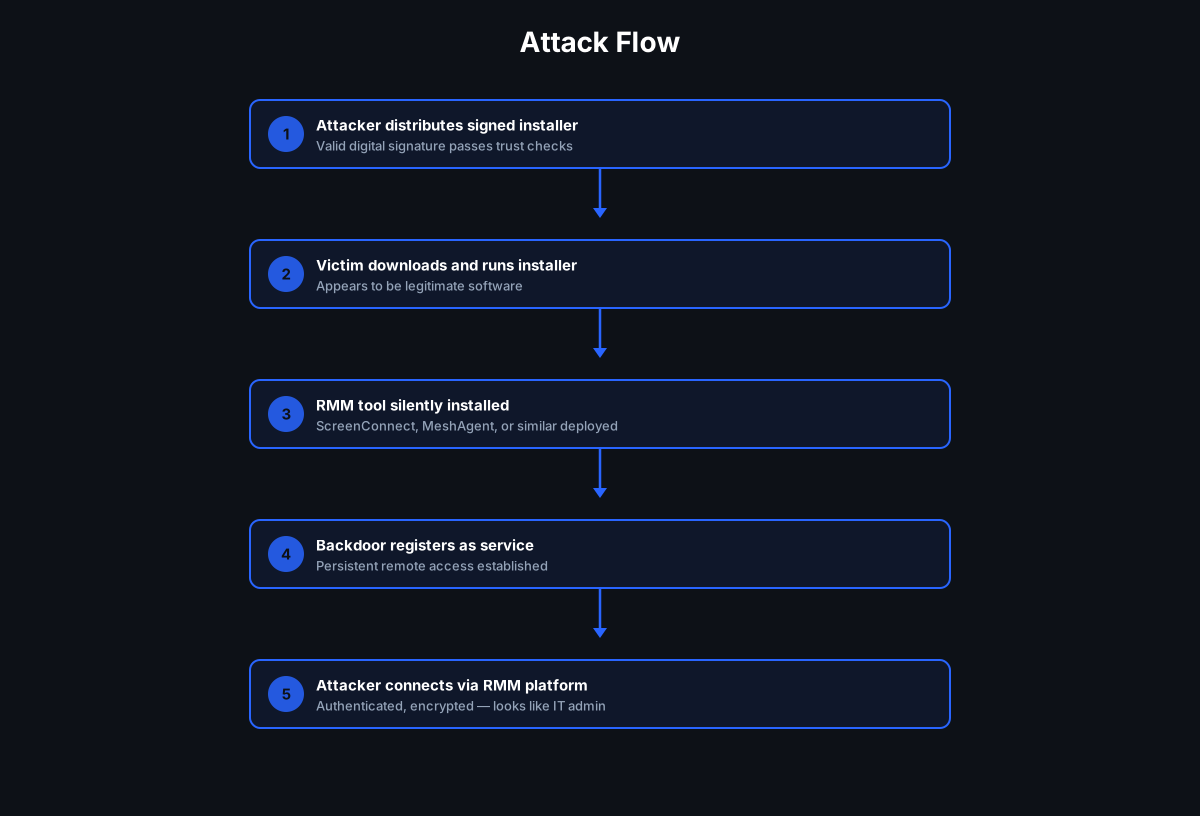
In plain English, the attack chain ThreatDown documented looks like this: (ThreatDown)
- Credential abuse. The attacker logs in using compromised RDP credentials — no exploit required (MITRE ATT&CK T1133, T1078).
- Payload download. Using Chrome, the attacker downloads the encryptor and places it in the user's
Musicfolder — a writable, low-suspicion location (T1105). - Manual, parameterized execution. The operator runs the binary by hand with targeting flags, for example:
servertool --delete C:\Users\<user>\Downloadsservertool --delete C:\Users\<user>\OneDriveservertool --delete C:\Usersservertool --delete C:\servertool --delete G:\My Driveservertool --delete G:\Shared Drive- Recursive, priority encryption. The encryptor performs a fully recursive walk with no depth limit and prioritizes the most recently modified files first — the active, business-critical data least likely to have fresh backups (T1486).
- Encrypt, verify, delete. It writes an encrypted temporary file, renames it to
.prinzeugen, verifies integrity (SHA-256,CHV1header), and — when--deleteis used — removes the original. - Anti-forensics and self-removal. It zeroes the in-memory key, forces garbage collection, and self-deletes via:
cmd.exe /C ping 127.0.0.1 -n 2 > nul & del /F /Q C:\Users\<redacted>\Music\servertool.exe(T1070). - Living-off-the-land footprint. Around the encryption, the actor abused RemotePC RMM, ran PowerShell stagers, pulled additional payloads, and created a backdoor admin account (
net user admin germania /add) (T1219, T1059.001, T1136).
Payload and Impact
The cryptography is modern and sound — ChaCha20-Poly1305 AEAD with per-file random IVs and an Argon2id/SHA-256/HKDF-SHA256 key schedule, chunked at 1MB — which means files encrypted by Prinz Eugen are not practically recoverable without the key. Because no ransom note is written to disk, victims are pressured out-of-band through direct contact or leak sites. The business impact is the familiar one: encrypted production data, deleted originals, and a data-extortion threat layered on top.
Why Traditional Defenses Struggle
This intrusion is designed to slip past detection-first controls:
- No known signature. Prinz Eugen is new, and a Go binary can be rebuilt to change its hash at will — so signature and hash-reputation lookups can miss it.
- A generic name in a normal place.
servertool.exein a user'sMusicfolder does not look alarming on its own. - Legitimate tools doing the work around it. RemotePC, PowerShell,
cmd.exe, and Chrome are all approved software in most environments, so their activity blends into normal administration. - Detection arrives mid-encryption. Behavioral detection often fires only once files are already being modified — and with active files encrypted first, even a fast response loses the most important data.
How White Cloud Security Trust Lockdown Stops This
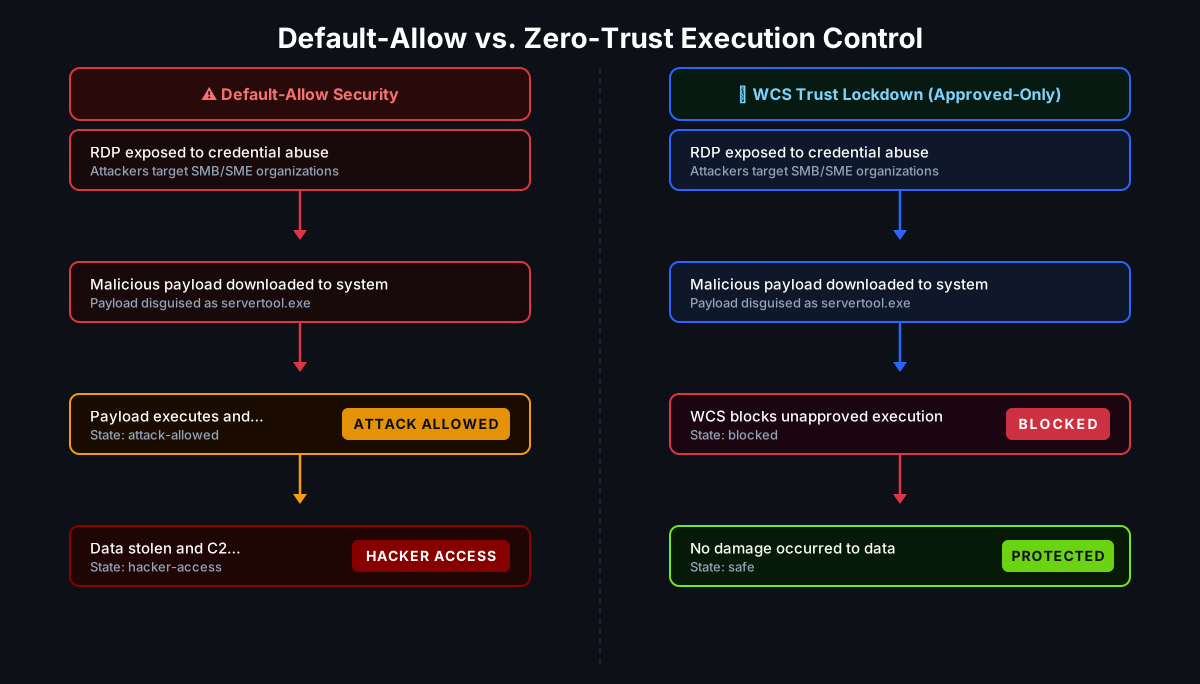
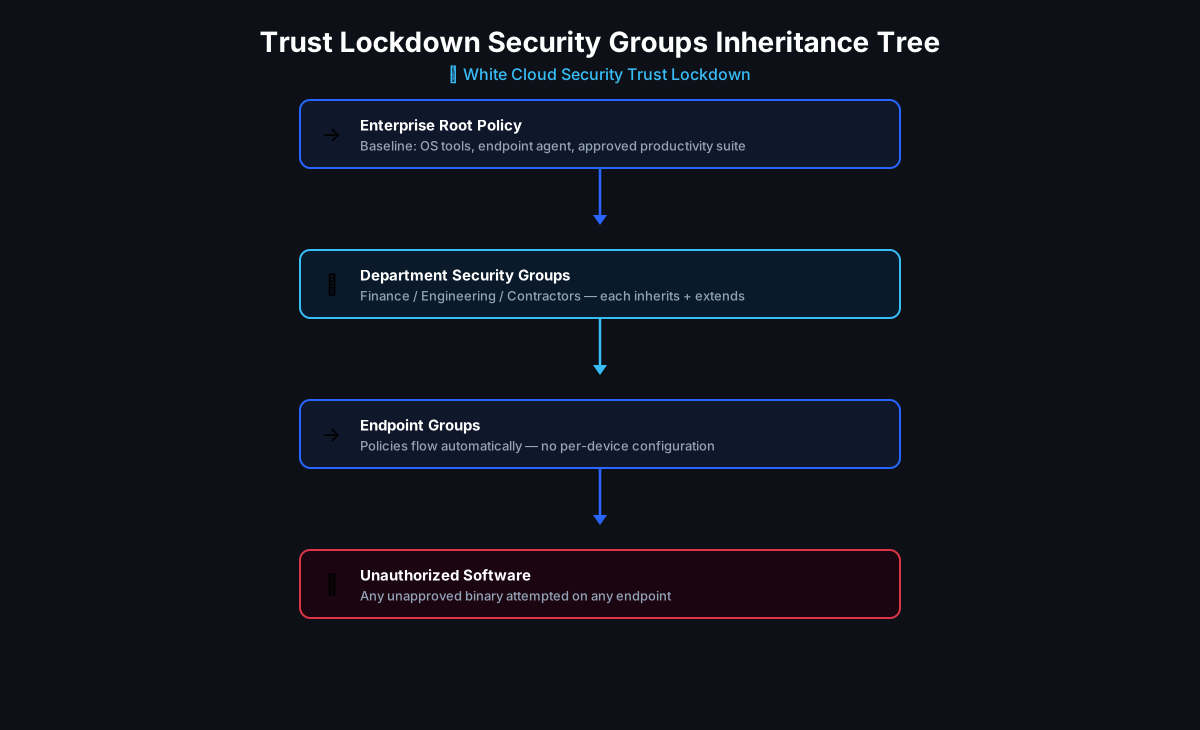
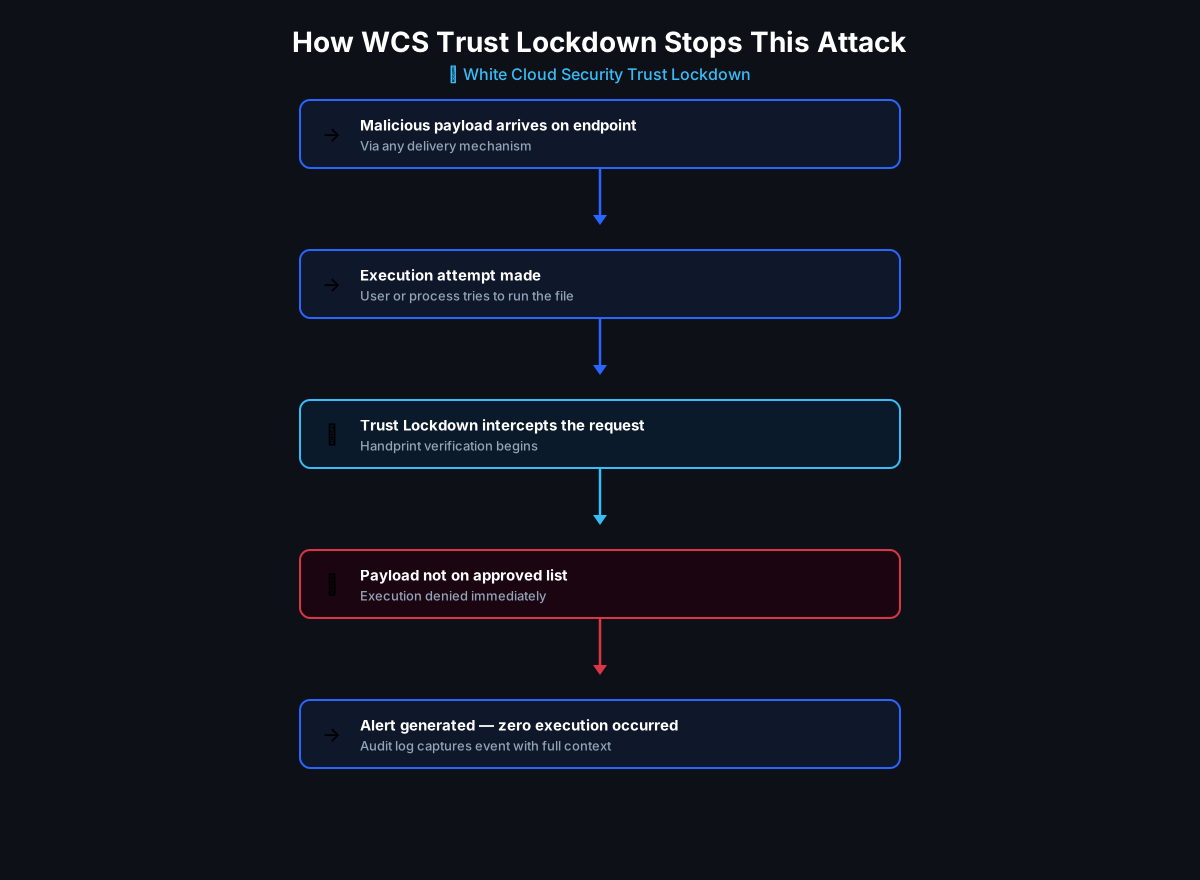
WCS Trust Lockdown is a default-deny, Zero-Trust App Firewall: nothing executes unless it has been explicitly Approved by application, publisher/certificate, handprint, and approved parent-child relationship. Everything else is Denied before it runs. Traditional security waits to detect malicious behavior after execution begins; WCS is designed to prevent unauthorized software from starting in the first place.
Mapping the Prinz Eugen chain to WCS controls
| Attack step | WCS control that blocks it |
|---|---|
servertool.exe downloaded to the Music folder |
unauthorized executable is Denied — presence on disk never implies permission to run |
| Encryptor launched from a user-writable folder (Music/Downloads/OneDrive/Google Drive) | Execution of unauthorized software is Denied |
| Rebuilt or renamed Go binary | Identity is verified by handprint, not filename — a new hash that isn't Approved is still Denied |
| RemotePC / PowerShell / cmd.exe launching the payload | Parent-child execution control stops an approved tool from spawning an unauthorized child process |
Recursive encryption, temp-file creation, rename to .prinzeugen, delete originals, self-delete |
All of this is downstream of execution — if the encryptor never starts, none of it happens |
The WCS Prevention Point: The critical prevention point is not after files begin changing. The critical prevention point is the moment an unauthorized executable attempts to start. WCS Trust Lockdown enforces that point.
Exact Software Approval via 6-Factor Handprint
Because attackers can rename files and rebuild Go binaries to defeat name- and hash-based defenses, WCS identifies Approved software by a 6-factor handprint — SHA-1, SHA-256, SHA-512, MD5, CRC32, and file length — that pins down the exact approved binary. A renamed or recompiled servertool.exe does not match any Permit policy, so it is denied regardless of what it is called.
Why IoCs Are Not Enough
ThreatDown published useful indicators — servertool.exe, the .prinzeugen extension, C2 infrastructure, and actor handles. These are valuable, but IoCs are reactive: they describe one incident after the fact, and they change the moment the attacker rebuilds the binary or rotates infrastructure. WCS focuses on execution approval instead. Even if the filename, hash, domain, or actor handle changes, the policy does not: unknown software is denied.
What WCS does — and does not — do here
WCS does not prevent the stolen RDP credentials, the login itself, or the data-theft threat. Those belong to identity security, RDP hardening, and network controls. What WCS does, when deployed in blocking mode, is ensure that compromised credentials do not automatically equal permission to run new ransomware. Even if an attacker logs in, an unknown servertool.exe is blocked from executing unless it has been explicitly Approved. WCS complements MFA, EDR, backups, RDP hardening, least privilege, and network segmentation — it does not replace them.
At White Cloud Security, we continue to track and report new hacking methods and tools — not just because of their immediate threat, but because patterns of reuse often expose the playbooks of these cybercriminal groups.
White Cloud Security blocks unauthorized software even when launched by an administrator-level or compromised account.
Recommended Mitigations
Practical steps to reduce exposure to Prinz Eugen and similar ransomware:
- Deploy default-deny application control in blocking mode so unknown executables cannot run from user-writable folders.
- Require MFA and harden RDP — restrict exposure, use a VPN/gateway, and lock down remote access.
- Govern RMM tools. Explicitly approve, monitor, and limit RemotePC and any other remote-management agents so they cannot become a universal software-launch bypass.
- Constrain parent-child execution from browsers, RMM agents, PowerShell, and
cmd.exeso approved tools cannot launch unauthorized payloads. - Enforce least privilege and audit for unauthorized local admin accounts (watch for additions like
net user ... /add). - Maintain tested, offline/immutable backups — prevention first, recovery as a backstop.
Indicators of Compromise
Source: ThreatDown / Malwarebytes. IoCs are reactive — treat them as a complement to execution control, not a substitute. (ThreatDown)
| Indicator | Type |
|---|---|
servertool.exe (SHA-256 686213cc11d36af764de824801bced9366dfca3823fe0d51b752f74149bcf1f4) |
Payload |
.prinzeugen |
Encrypted file extension |
212.80.7.74 (Frankfurt, DE) |
C2 / panel host |
https://212.80.7.74/serverscan.ps1, /stager/mini, /stager/ps1 |
PowerShell stager URLs |
stndrdbnk.cc, g-captchafestung.sbs, festung-e.duckdns.org |
Attacker domains |
net user admin germania /add |
Backdoor account creation |
| ROOTBOY, avtokz, GERMANIA | Actor handles |
Key Takeaways
- If ransomware cannot run, it cannot encrypt. The decisive event is not detecting encryption — it is stopping the unauthorized encryptor before it starts.
- New and custom malware defeats signatures. A rebuilt Go binary changes its hash; WCS verifies the exact Approved software by handprint or Code-Signing Certificate, so renamed or recompiled payloads are still denied.
- Living-off-the-land needs execution governance. RMM, PowerShell, and
cmd.exeare legitimate — parent-child control stops them from launching unauthorized payloads. - Prevention complements, not replaces. WCS works alongside MFA, EDR, backups, RDP hardening, least privilege, and segmentation to ensure compromised credentials don't become unrestricted code execution.
References
- ThreatDown / Malwarebytes — Prinz Eugen ransomware: a deep dive into a new Go-based encryptor (ThreatDown)
Further Reading
- Stryker, Shamoon, and the Case for Least Privilege Software Control
- Beware of Tools that Hackers Repurpose for Command 'n' Control
- When a "Zoom Installer" Is Not Zoom: Nimbus Manticore, MiniFast, and Default-Deny
- Why Informed CTOs and CFOs Use Trust Lockdown Instead of Detection-Based Security
Ready to Stop Ransomware Before It Starts?
White Cloud Security helps organizations eliminate ransomware execution risk by blocking unauthorized software before it can start. Prinz Eugen proves that attackers are combining custom malware, legitimate tools, and stolen credentials — and that detection alone can arrive too late. Trust Lockdown gives you a prevention layer that assumes compromise may happen but refuses to let unknown software execute.
Contact White Cloud Security to learn how Trust Lockdown can strengthen your ransomware prevention strategy.